1. How Scheduled Time is defined
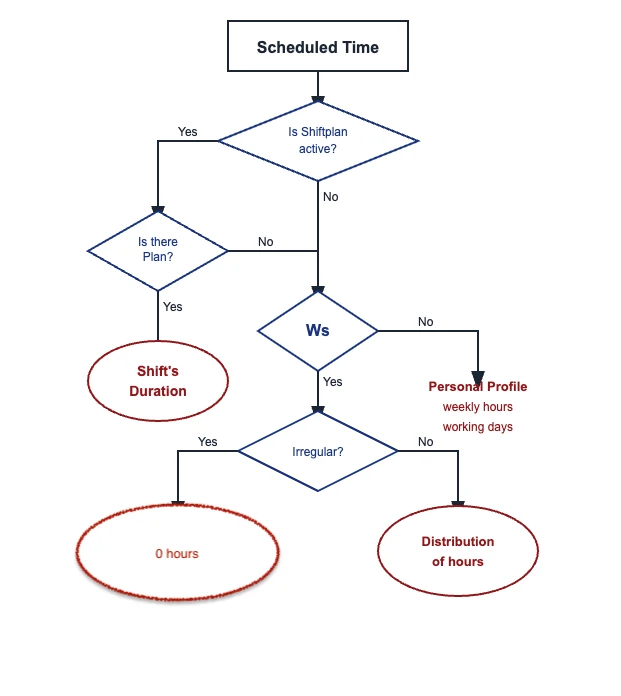
The system determines your employees' scheduled time using this priority order:
- Shift Plan (highest priority)
- Work Schedule:
- Personal Profile: contracted hours and contracted work days in the work section
The system always uses the first available source.
2. What you see per day
Each day shows your employees' scheduled time:
| Situation | What you see |
| ⚖️ Regular schedule | Hours from your Work Schedule |
| ≠ Irregular schedule | Hours from your Shift Plan |
| ⛱️ Holiday / Time off | 0h 0min |
| ❌ No shift planned | 0h 0min |
Important: If no published shift has been scheduled for that day, the system will always show 0h 0min.
3. Key Terminology distinction
- Scheduled time =The hours your employee is scheduled to work (according to Shiftplan or Work Schedule)
- Required time = The contracted hours you’re expected to work that week. Equivalent to contracted hours minus time-off and public holidays
4. Special case: No Shift Plan active
If:
1. You have an irregular work schedule, and
2. Shift Planning is not active
→ Your scheduled time will always be 0h 0min
5. Required time for irregular schedules
For irregular schedules, the system also calculates required time (the hours you are expected to work).
6. When required time is applied
If your scheduled time is lower than your weekly required hours, the system distributes your required hours across the week. For example, this is the case for on-duty employees with variable working hours.
7. How required time is calculated
Calculation: Weekly required hours ÷ Minimum working days = Daily required hours
Example: 32 hours per week ÷ 4 working days = Daily 8 hours required
8. Distribution logic
Option 1. If daily hours ≤ legal daily limit → distribute evenly
Example:
| Setting | Value |
|---|---|
| Weekly required hours | 32h |
| Minimum working days | 4 |
| Legal daily limit | 8h |
Calculation: 32 ÷ 4 = 8h
Result: 8h assigned to the first 4 working days
Important: You will not see this distribution of target hours in your employees' monthly view under the Employee profile > Attendance for individual days as planned hours. You can see it in the Date range view.
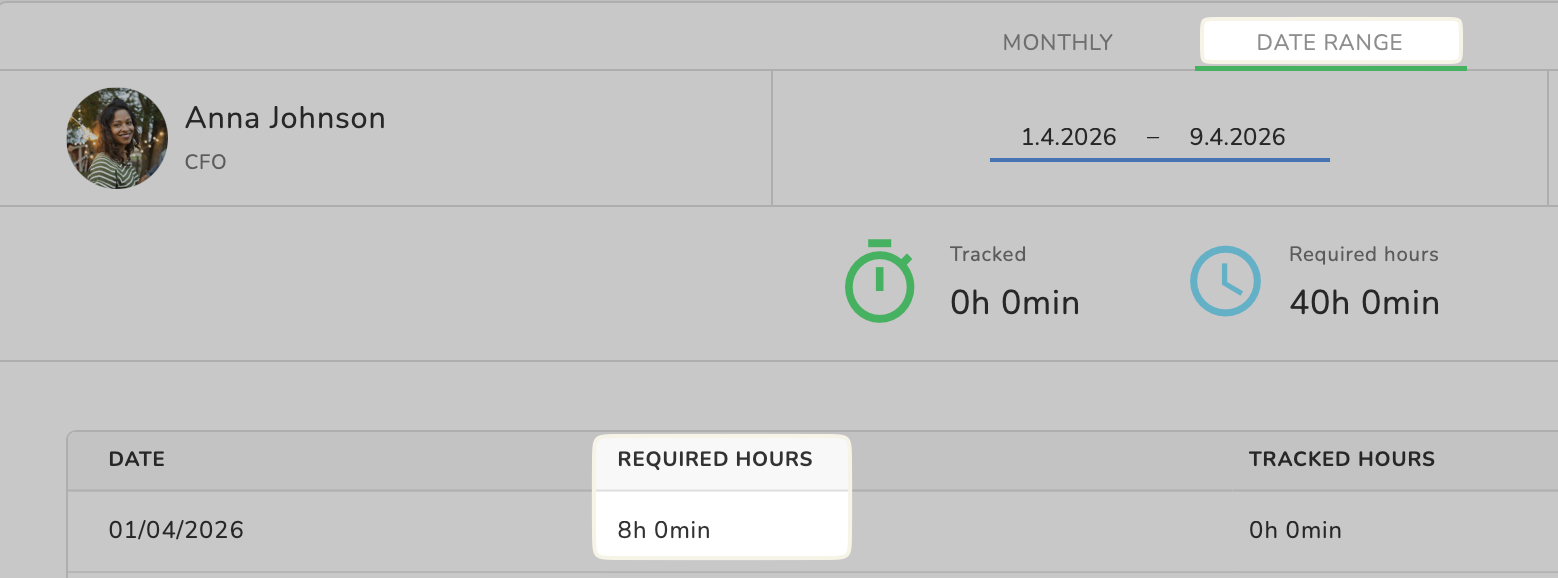
This calculation happens in the background and becomes relevant when the employee requests time off. Read more here about the time off policies for irregular work schedules.
Option 2. If daily hours > legal daily limit → cap at legal limit and spread across more days
Example:
| Setting | Value |
|---|---|
| Weekly required hours | 32h |
| Minimum working days | 3 |
| Legal daily limit | 8h |
Calculation: 32 ÷ 3 = 10,67 h
Result: Exceeds the daily limit by far, you need to distribute the remaining hours across an additional working day.
✅ Key takeaway for you and your employees:
- The system will never assign more than the legal daily limit per day.
- Weekly hours are spread across the minimum working days first, then extra hours if needed.
9. Quick summary
- Scheduled time comes from Shift Plan → Work Schedule → Employee Profile
- If nothing is scheduled → 0h 0min
- Required time helps fill gaps for irregular schedules
Was this article helpful?
That’s Great!
Thank you for your feedback
Sorry! We couldn't be helpful
Thank you for your feedback
Feedback sent
We appreciate your effort and will try to fix the article